Саяхан “Samgung” компаниас Galaxy S3-т суурилуулсан хамгийн гайхалтай таван онцлогийг танилцуулжээ. Дашрамд дурдахад өнгөрсөн жил “Аpple”-ийн iPhone 4S-ийг худалдаанд гарахаас өмнө нэг сая орчим хүн урьдчилан захиалж байсан бол, энэ удаа Galaxy S3 утсыг есөн сая хүн авахаар захиалгаа өгсөн нь дээд амжилт тогтоогоод байгаа аж.
VOICE БУЮУ ХИЙМЭЛ ОЮУН УХААН
 S Voice нь “Apple”-ийн Siriтэй төстэй үйлчилгээ бөгөөд “Samsung” компани “Google”- ээс гаргах Majel /хэрэглэгчийн асуусан асуултад хандаж хариулах үйлчилгээ/ төслийг хүлээх хангалттай хугацаа байхгүй байсан учир өөрсдийн зүгээс уг шинэ үйлчилгээг Galaxy S3-т суулгаж өгсөн байна. Өөрөөр хэлбэл, S Voice нь хэрэглэгчийн хувийн туслах болох бөгөөд сэрүүлэг тавих болон цаг агаарын мэдээг утаснаасаа асуухад хариулах юм. Түүнчлэн бусад өөрт хэрэгтэй мэдээллийг интернэтээс хайх хэрэг гарвал ердөө л утсандаа хэлэхэд л хангалттай болсон байна.
САЙЖРУУЛСАН КАМЕР
“Samsung” компани Galaxy S3-т 16, 12 биш ердөө 8 мегапикселийн камер суулгаж өгс өн нь зарим хэрэглэгчийн урмыг хугалах нэг шалтгаан нь байсан. Гэхдээ үүнийг голох хэрэггүй аж. Учир нь “Samsung”- ынхан 8 мегапикселийн камерт байж болох хамгийн дээд үзүүлэлтийг суурилуулсан байна. Өөрөөр хэлбэл, Galaxy S2 зураг авсныхаа дараа 1-2 секунд хүлээдэг байсныг өөрчилж маш богинохон хугацаанд зураг дарах боломжтой болгожээ. Үүнийгээ “Samsung”-ынхан бараг л хагас мэргэжлийн камертай зүйрлэх үйц буюу секундэд 3 зураг дарах боломжтой хэмээн тайлбарлаж байна.
САЛГАЖ БОЛОХ ЗАЙ ХУРААГУУР, НЭМЭЛТ БАГАЖ
Galaxy S3-ыг танилцуулахаас өмнө гарч байсан зарим таамаглалуудад салгаж болохгүй зай хураагуур, багтаамжийг нэмэх боломжгүй байх гэсэн цуу яриа гарч байв. Гэвч “Samsung”-ынхан шинэ утсандаа microSD картыг суулгаж багтаамжийг нь 64 Gb хүртэл нэмэх боломжтой болгосон гэнэ. Ингэснээр утасны зай хураагуур ажиллах боломжг үй болсон тохиолдолд заавал засварчин дуудах шаардлагагүй бөгөөд зүгээр л өөрөө солих хялбар байдлаар загварыг гаргажээ.
УТАСГҮЙГЭЭР УТСАА ЦЭНЭГЛЭХ БОЛОМЖ
Galaxy S3-ын хамгийн гайхалтай онцлогийн нэг нь Wireless буюу утасгүй сүлжээг ашиглан утасныхаа зай хураагуурыг цэнэглэх боломжтой болсон юм. Утсанд дагалдах Wireless цэнэглэх төхөө- рөмжөөр утсаа цэнэглэх нь энэ төрлийн технологийг ирээдүйд нэвтрүүлэхэд илүү дөхөм болсон хэмээн мэргэжилтнүүд үзэж байгаа юм.
НҮДНИЙ ХАРАХ ЧИГЛЭЛИЙГ ТОГТООХ ТЕХНОЛОГИ
Энэхүү үзүүлэлт нь Galaxy S3-т суурилуулсан хамгийн төгс систем гэж хэлж болно. Учир нь, утасны урд байрлах мэдрэгч болон камерын тусламжтайгаар уг технологийн гайхамшгийг мэдрэх боломжтой. Хэрвээ таны утас амрах горимд шилжин дэлгэц унтарсан тохиолдолд яах вэ. Мэдээж энэ тохиолдолд Lock-ыг гаргахын тулд дэлгэцэнд хуруугаараа хүрэх шаардлага гарна. Харин Galaxy S3-ын хувьд таны харцнаас шалтгаалан дэлгэцээ унтраах уу, үгүй юү гэсэн үйлдлийг хийх юм. Өөр нэг зүйлийг нэмж дурдахад хэрэглэгч утсан дээрээ залгах хүнийхээ дугаарыг харсны дараа утсаа чихэндээ ойртуулахад автоматаар шууд залгах болно. Үнэхээр гайхалтай биш гэж үү.
Should I buy the Samsung Galaxy S3?
The S3 is not a phone for folk with modest mobile needs or small amounts of cash to spend on a blower. Happily, those guys are spoilt for choice -- with so many great mid-range Android phones to choose from which will serve their mobile masters as faithfully as Old Yeller.
The S3 is a phone for people with serious power needs and a healthy bank balance. If you want a device for 3D gaming, HD video streaming and browsing the web -- I don't mean faffing around with mobile versions of websites or lightweight apps -- the S3 has the superpowered engine and massive display you're looking for.

The rectangular shape of the S2 (right) is replaced with a somewhat retro rounded design.
Indeed, this phone sits at the very top of the smart phone spectrum -- rival high-end Androids at this
lofty price are hard to find. The main alternative is HTC's quad-core brute -- the One X -- which is actually more affordable than the S3 but not such a powerhouse, judging by our benchmark tests.
The monthly toll for the S3 could buy you Apple's top-of-the-range blower, the iPhone 4S. Its iOS software is generally slicker and easier to use than Android but won't appeal to people who really like to drill down, tweak, tinker and customise their kit. So it's horses for courses.
It goes without saying that S3 buyers aren't likely to need hand-holding where technology is concerned -- instead they'll relish the fine-grained opportunities Android opens up for customising and controlling your digital environs.
Design
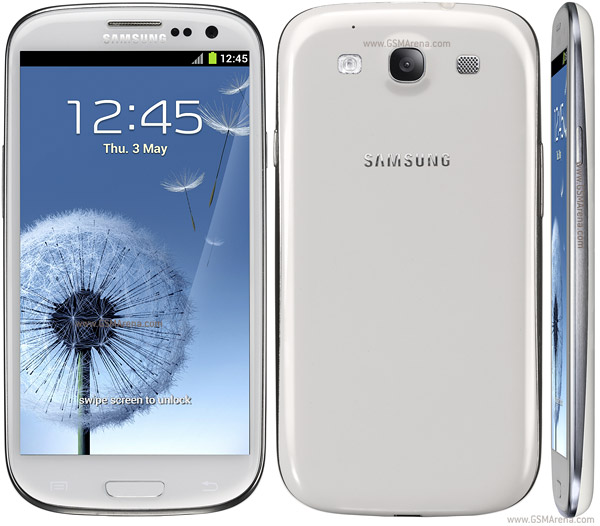
Samsung has ditched the rectangular look that dominated the S2, opting instead for an oval-shaped styling that's highly reminiscent of theGalaxy Nexus, which arrived in November last year.

The S3 has shed its lumpy bits around the back, with the camera lens neatly flush with the casing.
Corners are smoothed and rounded, while the curved back is devoid of the rear-facing lumpy bits that adorned the S2 and Nexus. The camera is now almost flush to the back of the casing, and along the edges is some swooping chrome decoration. Samsung's not ditched its button layout either -- there's a physical home button underneath the screen, with touch-sensitive menu and back keys on either side.
The placement of those touch-sensitive keys is slightly inconvenient. They're close to the edge of the phone, so you might find yourself accidentally triggering them with your hand.
The power key -- sited on the curved right-hand edge of the phone -- is also slightly troublesome. The chrome trim has a super-shiny coating so it's quite slippery, especially as it's sitting on a slight slope, and it also doesn't stick out much. The volume rocker on the left edge is much easier to lock on to. I also had no trouble firing the home key.

The Galaxy S3 retains its predecessor's physical home button.
I don't expect the new look will please everyone -- some folks within the CNET UK office have said the rounded corners on the back look dated, reminiscent of smart phones from several years ago. On the other hand, a simpler design is often better, and this 'pebble' styling is comfortable in the hand over long periods.
The S3 comes in either blue or white. The white version is glossy, while the blue option sports a brushed-metal effect. Don't despair if you're a fan of sultry black mobiles as the blue option is such a dark hue that it almost looks black. Samsung has a habit of releasing its mobiles in different shades later on, so I wouldn't be surprised to see a pink version surfacing later this year.

Shock, horror, it's 0.11mm thicker than the S2.
Millimetre one-upmanship aside, the bottom line is that the S3 is very thin and light considering its large size. The reason it's able to be so light is that -- like the S2 -- the Galaxy S3 is constructed from a significant amount of plastic. If you're averse to plasticky mobiles, the more substantial One X or metal-and-glass iPhone 4S might be more to your liking.
That said, despite all this plastic, the S3 has a very tactile and luxurious feel. The pebble design is a real pleasure to hold and the slender and light frame caresses the palm with no risk of weighing you down.

The back may be plasticky but it still retains a luxurious feel.
The plastic also has a luxurious sheen -- at least on the white model -- yet also manages to be slightly grippy so the phone sits snugly in the hand without feeling like it wants to slip out of your fingers.
It's worth noting that this phone is absolutely huge, with a screen that trounces the 4.65-inch Galaxy Nexus, and is ousized only by the ludicrous Galaxy Note.
Despite this massive screen, the S3 still feels manageable, even for smaller-handed folk, thanks to that slender, rounded and tactile form. If you're someone who likes to get to all your mobile stuff with one hand, you will find yourself having to stretch to reach everything. But the advantage of all that display real estate is that photos, videos and apps really do look gorgeous.
Build quality has typically been a strong point for Samsung phones and the S3 is no exception. Despite being predominantly plastic, it feels impressively stuck together. The screen is solid as a rock and ample amounts of chrome trim keep everything in order.
I was able to make the phone faintly creak by squeezing it from the sides. But considering the S3 has a removable backplate so you can get to the battery, micro-SIM and SD card slots, then this is to be expected. Overall, build quality has a very premium feel.
Screen
The S3's display measures 4.8 inches on the diagonal which, as noted above, makes it one of the biggest smart phones currently available. Some S2 owners are going to be unhappy about this increase in size -- since the S2's 4.3 inches is already plenty generous. Some would argue it had a perfect amount of pixels for a phone. But while you might find your knuckles bending in new and exotic ways, the benefit is that this whopping display will make your photos and video look stupendous.
With a 1,280x720-pixel resolution, the S3 will do justice to your high-definition footage, as well as leaving icons and text looking impressively sharp. This is an HD Super AMOLED screen, which is the same display tech used on the Nexus and Note, both of which are a real treat for the eyes.
AMOLED screens offer eye-searing colours and very deep blacks. But as with previous Samsung gear, if you're a fan of more demure, natural colour reproduction, then you might find this panel a little garish compared to the iPhone 4S.
There's one minor downside -- the S3's panel is missing the 'Plus' suffix that you'll find on the Galaxy S2's Super AMOLED Plus display. That means that the S3's screen is likely using a PenTile display, which has one fewer sub-pixel per pixel than the S2's panel.
Screen enthusiasts may be disappointed by this news, but I suspect most people will never notice the difference. All things considered this is a mighty fine display. It's truly glorious to eyeball and has a very impressive viewing angle. At times, as you tilt the phone away from you, the screen almost looks unreal -- as if it's been printed on the surface of the phone. Stonking stuff.

The 4.8-inch 720p-resolution display is looking gorgeous.
The S3's pixel density per inch is not actually the sharpest in smart phone town -- at 306ppi it's not quite as high-res as the Sony Xperia S (342ppi), or the HTC One X (312ppi), but this is really splitting hairs. Most people won't notice any difference in clarity and it's entirely possible to read text on a full website such as the BBC News home page when fully zoomed out.
Both Apple's iPhone 4 and iPhone 4S pack in more pixels (326ppi apiece) than the S3 does but arguably the two iOS devices need sharper resolutions, since their screens are a lot smaller (3.5 inches).
One area where the S3's screen did not knock my socks off is under direct sunlight. This is hardly surprising given that loads of smart phones struggle to outdo the sun's rays. However, the S3's display really struggles to make itself seen, with content ghostly and indistinct and a reflective blue sheen masking what's on the screen.
Too much sun is not a huge problem for Brits, but if you do need to use your mobile outdoors a lot then there are phones designed with outdoor viewing in mind.
Performance and battery life
The S3 sports a beefy quad-core processor clocked at 1.4GHz, which means it's more than capable of chomping through high-resolution video and graphically demanding games. As you'd expect, performance feels super-slick, with none of the sluggishness or lag that so often dogs Android phones.
A question hangs over whether quad-core processors are really needed, and you'll be hard pushed to find apps in the Google Play shop that stress the S3's processor to its limits. But what you do get is peace of mind, knowing that the S3 has a good chance of handling any demanding apps that crop up in the future. A more powerful processor also means the S3 is less likely to be left out in the cold when the next version of Android is rolled out.
With the broad display real estate, high-resolution and powerful processor, it's no surprise the S3 excels at web browsing. Websites not only look glorious on the S3's display but are typically very quick to load and render, and a real joy to swipe, pinch and flick around.
The S3 scored 1,498.9ms on the SunSpider JavaScript benchmark test, which evaluates a browser's speed -- beating the iPhone 4S's score of 2,181.6ms by a considerable margin, and more than halving the Samsung Galaxy S2's 3,445.3ms. Lower is better in this test as it's a measure of time taken.

The browser zips along at twice the speed of the S2.
In the Vellamo browser benchmark test, the S3 scored 2,077 -- but was just beaten into second place by the HTC One XL (a phone that's not yet launched in the UK).
Despite this minor blip, there's no doubt the S3's quad-core chip is a high-calibre performer -- indeed, in the mobile world right now, the S3 is top of the power pops.
On the Antutu benchmark, which tests memory, CPU speed and graphics, the S3 scored a whopping 12,112 -- beating both the Asus Transformer Prime tablet-cum-laptop and streaking past the quad-core HTC One X. The latter managed an impressive, but not quite as good, 10,827 on this benchmark.
Running Quadrant's benchmark, the S3 again topped out the Android power charts, scoring 5,289. HTC's One X managed 4,904 on this test.
I also tested the S3's capacity to handle 3D graphics by running GL Benchmark's Standard Egypt test. The S3 ran this at a whopping 59 frames per second -- the same rate as the new iPad -- and slightly faster than the HTC One X's rate of 52fps.
All this power and the big screen definitely take a toll on battery life. The S3 comes with a removable 2,100mAh battery -- a welcome boon if you like to carry a spare (or two), which is one way to manage its voracious appetite for juice.
At full brightness, the screen gobbles battery faster than Cookie Monster omnomnoming biscuits so you'll need to keep a weather eye on the little battery icon in the corner of the screen. Ideally you should avoid using the screen at max brightness for long periods.
With the screen set to half brightness, the S3's battery dropped from 100 per cent to 60 per cent after around 3.5 hours streaming an HD video over Wi-Fi. So provided you don't insist on dialling the screen up to max brightness, you should eke a full day's worth -- circa 6 or 7 hours -- of video streaming on a single full charge.
I also tested the S3's battery using Antutu's battery benchmark, which tests battery performance over several hours. The phone lasted 1 hour 12 minutes on part one of the test, dropping from 100 per cent battery to 73 per cent. It endured 1 hour 9 minutes on the second part of the test, dropping from 73 per cent to 46 per cent.
Overall, on the Antutu battery benchmark, the S3 scored 597, beating the HTC Incredible S, Motorola Milestone, Samsung Galaxy S2 and theLG Optimus 2X, among other devices. It was beaten by the Motorola Xoom tablet and the Acer Iconia Tab A500.
Expect to charge the phone every night -- or sooner if you're using it a lot or revving its engines too much. It's also worth noting the S3 is quite slow to charge over USB. If you need a lot of power quickly, you'll have to find a wall socket to juice up.
Samsung has added a power saver mode to the S3 that can be customised to limit the maximum performance of the CPU, dim the screen, change background colour in email and the Internet and turn offhaptic feedback.
Of course, you could say what's the point of spending all this money on a beast of a phone, only to throttle it? Which brings me back to the question of whether quad-core isn't overkill for a mobile phone right now. But the S3's extremely slick performance does make it a joy to use -- with apps downloading and loading quickly, HD videos playing smoothly and menus and gallery photos zipping around, eager to do the bidding of your fingertips.
Software and apps
The Galaxy S3 is running on Android, Google's mobile operating system. Specifically, the S3 is powered by Android 4.0, aka Ice Cream Sandwich, which is the latest, greatest version.
It's not quite that simple though, as Samsung's plastered its own interface on top of Android. Called TouchWiz, this is the same colourful interface you'll see on kit like the Galaxy S2 and Galaxy Note.
There are new goodies on board, including a 'Pop up Play' feature that lets you watch videos while performing boring functions like sending a text, and a transfer tool called S Beam, which lets you send large files over a Wi-Fi connection.
Pop up Play worked well when I tested it -- allowing me to overlay and playback a mini version of a video I captured or stored on the phone. The video can be overlayed over a web page or app such as Twitter -- so you can both watch and tweet.
Voice control is on board too, now dubbed S Voice. This feature has been bundled into Android's Face Unlock capability -- so now you can choose to have the phone demand to see your phizzog and hear your voice before it unlocks.
S Voice goes toe-to-toe with Apple's own voice-controlled assistant, Siri. And like Siri, you can get S Voice to tell you the weather or perform tasks like making a call, setting an alarm, controlling music playback or taking a photo.
Early impressions of S Voice aren't super-positive -- it had trouble recognising my voice, was slow to process sounds and ultimately seemed gimmicky rather than genuinely useful. Most of the time it's much quicker to tap to get to the function you're after, rather than faff around with S Voice.
Setting up Face plus Voice Unlock took multiple attempts to run through the vocal stage as my efforts to use my own voice repeatedly failed to win the approval of a very disappointed-sounding female-toned S Voice. Eventually I managed to set it up -- but I can't imagine too many people will want to have to speak to their phone every time they need to unlock it (Sergey Brin excepted).

S Voice goes toe-to-toe with Apple's voice-activated assistant, Siri.
The previously Apple-exclusive Flipboard app also makes an appearance. This app turns links and updates from your social networks into an attractive, magazine-style layout. Flipboard really comes into its own on the S3's large, glorious display, and can also live on your home screen in an attractive widget form.
Those with files to hoard will be happy to know the S3 comes with two years of online storage app DropBox, giving you an impressive 50GB worth of virtual disk space on which to plonk your files.
Other Samsung additions such as S Suggest, Samsung Apps and the Games Hub give you multiple ways to get to content you can download from Google's Play Store. At the time of writing, Samsung's Music Hub service wasn't yet up and running.
The much-trumpeted eye-tracking technology that keeps the screen on if it detects a face looking at it -- one of Samsung's 'designed for humans' touches -- is more irritating than useful. If you're watching the phone at an angle so your face isn't directly in front of it, it won't see you anyway. It also doesn't appear to be active on the home screens or app screens so it only kicks in when you're using apps, the camera or web browsing.
TouchWiz has buckets of competition, whether it's from Apple's iOS operating system, the 'raw' Android experience found on the Galaxy Nexus, or rival manufacturer Android skins like HTC's excellent Sense interface.
TouchWiz on the S3 looks polished, with lots of carefully drawn icons and easy-to-read fonts. But when it comes to easy of use, it's not always as well thought through as HTC's latest Sense overlay. At times, the intuitive action does not yield the hoped for result.
For example, adding widgets to the home screens is not done by long-pressing the place where you want to add the widget. Rather you have to dive into the apps view, switch to the widgets tab and then long press on a widget -- then move it onto the home screen position of your choice.

The latest version of Android, Ice Cream Sandwich, is a welcome addition on the S3.
It's a minor quibble but one indicative of TouchWiz's tendency to be a tad gnomic. S2 owners won't have any trouble navigating the S3's interface since they're retreading familiar ground. Newbies will need to get accustomed to Samsung's way of doing things though.
Android is a powerful, flexible operating system that affords users loads of scope to customise and tinker with their phone. But the wealth of options and tools available can be overwhelming to newcomers, which makes having a really slick interface especially important.
If you're after something easy to use and don't mind sacrificing the ability to customise the look and feel of your phone, you'd be better served by Apple's iOS platform. Anyone who prefers freedom to muck about with their mobile, however, will enjoy digging into Android. There are scores of different versions of Android to choose from -- from 'vanilla' Android, straight as Google intended it, to the raft of manufacturer-crafted Android skins.
A risk you take with opting for a device sporting one of these skins is that you might be left waiting for updates, while those with 'vanilla' Android kit like the Galaxy Nexus are updated very quickly. The Samsung Galaxy S2 Ice Cream Sandwich update proved to be an omni-shambles -- worth bearing in mind if you love getting the latest version as quickly as possible.
Camera
The S3 has an 8-megapixel camera, which is the same resolution as last year's Galaxy S2. It might not have bumped up the pixel count, but this blower does have a few new tricks up its sleeve, including the zero-shutter-lag trait seen in the Galaxy Nexus, and a clever feature that automatically suggests your best shot after you've fired off a few similar snaps, basing its decision on factors like smile detection and face recognition.

There are loads of camera options to muck about with.
A new feature borrowed from the HTC One X is the ability to take still images while you're recording video -- perfect for when your pet is doing something adorable.
The S3's camera can be very good indeed -- producing excellent close-up shots, both indoors and out, and having an impressively shallow depth of field.

The level of detail on this close-up shot of a flower, plus the shallow depth of field, shows the S3's lens at its very best (click image to enlarge).
Colours are generally true to life, with a slight tendency to oversaturate certain shades.

Let them snap cake! The S3 proves it can produce a droolingly good-looking photo (click image to enlarge).
The lens can be a touch fickle when dealing with variable light conditions across one scene. I found it has a tendency to wash out parts of the scene, and it can also suffer from lens flare.

Southwark's church looks majestic on a hazy morning but there is a slight tendency to wash out the sky (click image to enlarge).
On the plus side, it's good at dealing with the lower light of an indoor environment. Unless it's really dingy, clarity is good and photos don't speckle with noise.

If it's shallow depth of field you want then look no furtherb than the S3's cam (click image to enlarge).
The S3 shoots Full HD video at 1080p resolution. Video results during testing were less impressive than the still shots, with a tendency to look hazy. Levels of detail also drop off with even relatively slow -- walking pace -- levels of movement in the frame.
Add to that, the S3 review unit I used had an audio recording glitch, which manifested in three videos I shot with the phone (listen to the audio in the two YouTube clips below). It's entirely possible this glitch is an isolated case on one faulty handset.
There's a 2-megapixel camera on the front of the S3 that's used for video calling, Face Unlock and Samsung's face detection feature -- which stops the phone's screen from dimming as long as you're looking at it.
Audio, ports, NFC and connectivity
As well as internal micro-SIM and microSD card slots, there's a 3.5mm headphone jack on the top edge of the phone and a micro-USB port on the bottom edge for charging the phone and transferring files, videos and music to and fro.
Like the S2, the S3 has a rear speaker. But instead of being sited down low, it's positioned right up towards the top of the phone, next to the camera. Sound quality is good but the audio doesn't go especially loud. At the top of its range, songs can have a slight crackle.
The position of the speaker can affect the quality of the sound. If you're looking at the face of the phone, the rear-sited speaker is blasting away from your ears. An arguably better position for a second speaker would be on one of the phone's edges. However, the S3's pebble design means there's precious little room there.
Call quality is excellent and I had no trouble hearing or being heard. I also didn't experience any dropped calls.
Contactless sharing technology, or near field communication (NFC), is also on board. That's good news if you're a fan of NFC tags.
There's no support for the fastest current 3G technology, DC-HSPA, though -- in either its 21Mbps or 42Mbps variant -- so be aware that this phone is very much a 3G-only blower, despite previous reports to the contrary.
Conclusion
With the Galaxy S3, Samsung hasn't messed with its formula much, recognising that slick design and a gorgeous screen were the secret to the Galaxy S2's success. The S3's oval shape may not be an instant eyeball grabber but those pebble-like curves are made to caress the digits that are holding it. To this enticing design, Samsung has added an upgraded engine -- making a phone that's pretty much unrivalled in the speed and power stakes right now.
On the down side, the TouchWiz interface is occasionally frustrating, and Samsung's app offerings don't always hit the mark. These minor software concerns aside, the S3 will undoubtedly be one of the year's most important gadgets. There are very few phones that come close to matching Apple's premium, luxurious feel, but with the S3, Samsung has got closer than anyone.
- Get link
- X
- Other Apps
Labels
IT PR news Танд дуулгахад
Labels:
IT
PR news
Танд дуулгахад
- Get link
- X
- Other Apps
Comments